


Table of Contents
Creating a fictional music project can go far beyond inventing a band name and generating an album cover. With careful planning, AI tools can help you build an entire believable music world: original performers, personal histories, a coherent visual identity, a concept album, complete songs, cover artwork, archival photographs, and an interactive website that presents everything as one finished cultural artifact.
This guide explains the full workflow behind that kind of project. The finished result can resemble The Static Saints — When the Signal Dies: a fictional European band with four distinct members, a nine-track album, an invented musical genre, individual song histories, playable audio, lyrics, portraits, a chronological archive, and a visual gallery.
The most important lesson is simple: do not treat the music, characters, images, and website as separate tasks. They should all be designed as parts of the same world.
Finished Example: The Static Saints
The project shown below demonstrates what this workflow can produce when the fictional history, music, character design, visual continuity, and web presentation are developed together.
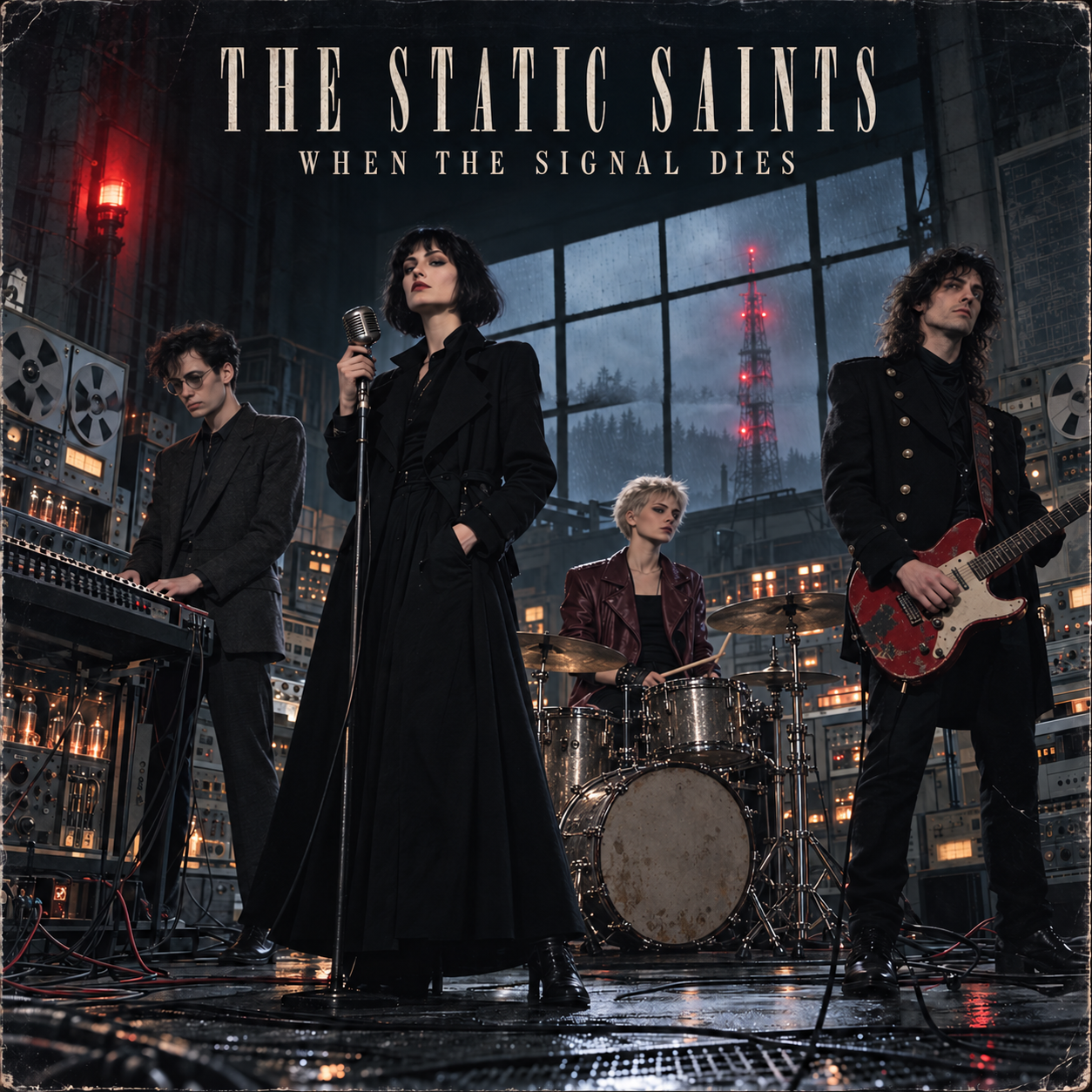
FINISHED AI ALBUM PROJECT
The Static Saints — When the Signal Dies
This finished fictional archive combines a four-member European band, an invented genre called ghostwave, a documented formation history, nine connected songs, individual track covers, playable MP3 files, expandable lyrics, a composition chronology, and six archival photographs.
Use it as a practical reference while following the steps in this guide. Notice how the same concept continues through the biographies, song descriptions, album artwork, portraits, interface, and gallery.
The example is most useful when opened in a second browser tab. You can compare each stage of this tutorial with the corresponding section of the completed project.
1. Start With the Central Idea
Before creating names, portraits, or songs, define the project in one or two strong sentences. This is the creative rule that every later decision must follow.
A useful starting concept should answer five questions:
- Who is the artist or band?
- Where and when did they exist?
- What kind of music did they create?
- What makes their story unusual?
- Why would somebody want to explore their archive?
For example, The Static Saints were imagined as a four-piece European group active in West Berlin between 1983 and 1987. They combined cold synth-pop, post-punk guitar, mechanical percussion, analog electronics, and damaged radio transmissions. Their only album was supposedly recorded during nine winter nights inside an abandoned Cold War transmission hall before the master tape disappeared.
That short premise already establishes the period, location, sound, atmosphere, technology, and central mystery.
Build a concise concept statement
Use this template:
[Band name] were a fictional [nationality or location] band active during [years or period]. Their music combined [genres and instruments] into a style they called [invented genre, if applicable]. Their defining album, [album title], was created under [unusual circumstances], and became known for [mystery, event, or artistic distinction].
Keep this statement visible throughout the project. If a new song, image, costume, or website element does not support it, it probably does not belong.
2. Define the Sound Before Writing the Songs
A fictional band becomes believable when its music has rules. Simply describing the group as “electronic rock” is not enough. Decide what listeners should hear repeatedly across the album.
Create a short sound bible containing:
- primary genre and secondary influences;
- typical tempo range;
- lead vocal type;
- permitted backing vocals;
- core instruments;
- recurring production techniques;
- emotional tone;
- period-appropriate recording quality;
- sounds or clichés that should be avoided.
For a project inspired by damaged radio archives, the recurring vocabulary might include sparse analog bass, dry mechanical drums, angular guitar, shortwave hiss, tape flutter, relay clicks, filtered voices, and wide synthesizer layers. Another project could use acoustic strings, close vocal harmonies, room ambience, and field recordings of rural environments.
Inventing a genre
An original genre name can make the fictional world more memorable, but it needs a clear definition. Avoid creating a label that has no audible meaning.
Use this formula:
[Genre name] is a fusion of [genre one], [genre two], and [distinctive sound source or production idea], characterized by [rhythmic quality], [vocal character], and [emotional atmosphere].
Once defined, the genre should influence the songs, cover art, typography, photographs, and website interface.
3. Create Band Members Who Do Not Feel Interchangeable
Each member needs more than a name, instrument, and fashionable outfit. A convincing biography should explain how that person became the musician seen in the project.
For every member, establish:
- full name or stage name;
- year and place of birth;
- family and social background;
- childhood environment;
- education or former occupation;
- first connection with music;
- personality and working habits;
- role inside the band;
- relationship with the other members;
- contribution to writing and production;
- signature instrument or object;
- visual appearance and clothing.
The members should not all come from the same kind of family or follow the same route into music. One may have classical training, another may be self-taught, another may have worked in electronics, theatre, factories, radio, design, or live production. Different backgrounds create natural creative tension and give the band history something to work with.
Separate personality from function
The founder does not automatically need to be the singer. The most visually striking member does not need to be the main songwriter. A drummer may be responsible for field recordings, while a guitarist may have joined the group first as a lighting technician. These unexpected combinations make fictional biographies feel less manufactured.
4. Lock Character Identity Before Generating Many Images
Visual inconsistency is one of the fastest ways to break the illusion. If the singer looks like four different people across the album cover, portrait, rehearsal photograph, and concert image, the project stops feeling like an archive.
Create a Character Identity Bible for every person before producing the full visual set.
Include:
- exact age during the project;
- height and body type;
- face shape and bone structure;
- eye color and expression;
- nose, lips, eyebrows, and distinctive marks;
- exact hair color, length, texture, and style;
- normal stage and everyday wardrobe;
- accessories;
- signature instrument;
- details that must never change.
Reusable identity-lock prompt
CHARACTER IDENTITY LOCK — [FULL NAME]:
The exact same fictional adult person in every image. [AGE, ORIGIN, HEIGHT, BUILD, FACE SHAPE, EYES, NOSE, LIPS, HAIR, DISTINCTIVE FEATURES]. Preserve the exact same facial structure, age, body proportions, hairstyle and identifying details in every image. No substitute actor, no alternate interpretation and no age change.

Signature wardrobe: [CLOTHING].
Signature instrument or object: [MODEL, COLOR, CONDITION AND UNIQUE DETAILS].
If the image generator supports reference images, create and approve the neutral portraits first. Use those portraits as identity references for every later group image.
 Explore the finished project →
5. Create an Equipment and Period-Continuity Bible
Faces are not the only continuity problem. Instruments, drum kits, microphones, amplifiers, studio equipment, and clothing often change accidentally between images.
Before generating the album cover and gallery, define:
- whether the drums are acoustic, electronic, or hybrid;
- exact colors and construction of the drum kit;
- guitar models, finishes, damage, stickers, and straps;
- keyboard and synthesizer types;
- microphone style;
- amplifiers, tape machines, and studio furniture;
- recurring stage layout;
- visual technology appropriate to the chosen year;
- each member’s recurring wardrobe.
This step prevents a modern electronic kit from appearing on the album cover while the gallery shows an unrelated vintage acoustic set. If a battered red guitar is established as a signature object, it should remain recognizably the same guitar throughout the project.
6. Write the Band History as a Separate Narrative
The story of the band is not the same thing as the story told by the album. Keep them separate.
The band history should explain:
- who started the project;
- where the first experiments took place;
- how each member joined;
- how the group chose its name;
- when its musical identity became recognizable;
- when the first song was completed;
- how long the members worked together;
- where the album was recorded;
- what changed during or after the sessions;
- whether the group separated, disappeared, evolved, or continued.
A strong history uses specific months, years, locations, occupations, and small practical details. It should read like a condensed documentary account rather than promotional copy.
Build a band timeline
A website timeline can include entries such as:
- founder begins the project;
- lead singer joins;
- rhythm section develops;
- final member completes the lineup;
- band name is adopted;
- first performance;
- recording sessions begin;
- album is completed;
- final performance or end of the group.
Do not use song titles as generic timeline headings unless that entry genuinely concerns the writing or recording of that song.
7. Design the Album as a Connected Story
A concept album works best when every song has an individual identity while moving the larger story forward.
Before writing lyrics, outline the album as a sequence:
- introduction to the world;
- first anomaly or conflict;
- growing evidence;
- escalation;
- midpoint revelation;
- consequences;
- deeper discovery;
- collapse or confrontation;
- resolution, disappearance, or open ending.
This structure does not need to be stated directly to the audience. It exists to prevent nine tracks from repeating the same situation.
For every track, prepare a song card containing:
- album number;
- title;
- month and year written;
- credited writers;
- real-world origin inside the fictional biography;
- lyrical premise;
- role in the album narrative;
- musical identity;
- recurring motif;
- ending or transition into the next song.
Composition order and album order
These are often different. Showing both makes the archive more convincing.
The album track list represents the listener’s journey. The song chronology shows how the musicians actually developed their ideas. On the example project, the chronology explicitly explains that its dates come from rehearsal cassettes and handwritten logs and that the entries are presented in writing order rather than final running order.
8. Generate Each Song as a Complete Production Package
Do not create only a title and lyrics. Treat every track as a small self-contained production.
A useful AI music package includes:
- title;
- style prompt;
- structured lyrics;
- vocal directions;
- production notes;
- negative or anti-prompt;
- short public description;
- genres and tags;
- square cover prompt;
- final audio filename.
Style-prompt structure
[PRIMARY GENRE], [SECONDARY INFLUENCE], [TEMPO AND RHYTHM], [CORE INSTRUMENTS], [LEAD VOCAL], [BACKING VOCALS], [PRODUCTION CHARACTER], [EMOTIONAL ARC], [PERIOD OR RECORDING TEXTURE]Lyrics and production directions
Technical labels such as [Verse], [Chorus], [Bridge], and short vocal cues are useful during music generation. However, the public lyrics panel should not be filled with long production instructions such as microphone types, mix changes, or synthesizer settings.
Create two versions:
- generation lyrics, containing useful performance and production cues;
- display lyrics, cleaned for the listener while retaining section names and dialogue that belongs to the song.
Do not insert band-member names into lyrics unless the narrative genuinely requires them.
9. Verify Song Descriptions Only After the Audio Exists
This is one of the most important quality-control stages.
An early concept may say that a song contains railway relay samples, a tunnel recording, or a particular percussion technique. If the finished audio does not clearly contain those sounds, the public description must not claim that it does.
After all songs are generated:
- read the final lyrics;
- listen to the complete audio;
- identify the opening texture;
- note the actual bass, percussion, guitar, synthesizer, or acoustic elements;
- describe changes between verse, chorus, bridge, and ending;
- verify vocal roles;
- remove imagined details that cannot be heard;
- connect the description to the song’s real lyrical scene.
The final description should make the listener think, “Yes, that is the track I am hearing.”
10. Design the Album Cover and Individual Track Covers
The album cover establishes the master visual language. Create it only after the character and equipment bibles are stable.
Define:
- aspect ratio, usually 1:1;
- composition;
- color palette;
- location;
- lighting;
- photographic or illustrative process;
- typography;
- whether all members appear;
- which instruments are visible;
- how the album’s mystery or theme is represented.
Album-cover prompt template
Square 1:1 album cover for the fictional band “[BAND NAME]” and album “[ALBUM TITLE]”. Show the exact same musicians defined in the Character Identity Bible, preserving their faces, ages, hairstyles, wardrobe and signature instruments. [EXACT SCENE AND LOCATION]. [LIGHTING, COLOR PALETTE, HISTORICAL PERIOD AND IMAGE-MAKING STYLE]. All instruments and equipment must match the Equipment Continuity Bible. Elegant readable title “[ALBUM TITLE]”. No additional text, no logos and no celebrity likenesses.Each song cover should depict a recognizable moment, object, or location from that track’s lyrics while retaining the album’s shared palette, typography, period, and texture.
Avoid nine covers that are merely different portraits of the singer. The covers should expand the album world.
11. Generate Neutral Portraits Before Complex Group Scenes
Create one square portrait of every member against a simple, period-appropriate background. These are not crops from the album cover. They should look like intentional portrait-session photographs.
Portrait-prompt template
Square 1:1 editorial portrait photograph of [FULL CHARACTER IDENTITY LOCK]. The musician stands naturally in front of a simple period-appropriate studio wall, relaxed posture, direct or slightly off-camera gaze, subtle natural expression, realistic skin texture, authentic [DECADE] photography, soft controlled lighting and restrained color palette. No stage performance, no collage, no text and no logos.Approve these portraits before moving on. They become the primary visual references for the website and future images.
12. Build a Gallery That Tells the Band’s History
A useful visual archive should not be a random set of attractive images. Each picture should represent a different stage in the group’s development.
A six-image gallery might show:
- the first meeting or earliest experiment;
- a basement rehearsal;
- writing or arranging a song;
- recording inside the main album location;
- a backstage or promotional moment;
- the final concert, broadcast, session, or disappearance.
For every image, prepare:
- title;
- approximate date;
- location;
- aspect ratio;
- scene description;
- visible members;
- complete identity locks;
- equipment continuity instructions;
- wardrobe continuity instructions;
- website caption and alt text.
Vary the formats intentionally. A visual archive can combine 16:9 session images, 4:5 portraits, and 3:2 documentary photographs, provided the website layout supports them.

Explore the finished project →
13. Prepare and Organize the Assets
Use clear filenames without spaces or special characters. A predictable structure makes the website easier to build and move to a server.
project/
  index.html
  assets/
    album-cover.jpg
    hero-band.jpg
    members/
      01-member-name.jpg
      02-member-name.jpg
    tracks/
      01-song-title.jpg
      01-song-title.mp3
      02-song-title.jpg
      02-song-title.mp3
    gallery/
      01-first-meeting.jpg
      02-rehearsal-room.jpg
Before coding, confirm that you have:
- the final album cover;
- one approved portrait per member;
- one cover per track;
- all final MP3 files;
- cleaned display lyrics;
- verified song descriptions;
- at least six gallery images;
- captions and alt text;
- the final biographies and timelines.
Building the interface before these materials are ready usually creates unnecessary rewrites.
14. Structure the Website Like a Digital Music Archive
The website should guide visitors from curiosity to immersion.
Recommended page order
Hero
Introduce the band name, genre, period, album title, and strongest one-line hook. Use a powerful group image or album-world visual.
The Origin or Lost Album
Explain the central concept in a short, atmospheric section. Include useful summary statistics such as years active, number of tracks, or number of recovered recordings.
Meet the Band
Show square portraits, roles, birth details, and readable biographies. Give each member enough space to feel like a real person.
Band History
Present the formation story chronologically. This is where the founder, joining order, first rehearsal, name, artistic development, and ending belong.
Song Chronology
List every song by month and year of composition. Explain its origin using the final lyrics and verified audio. Clearly state that composition order may differ from album order.
Album Archive
Present the cover, title, year, genre, running time, and album concept.
Interactive Track Player
Selecting a song should load:
- track number and title;
- square cover;
- audio file;
- play and pause controls;
- seek bar;
- current time and total duration;
- verified description;
- expandable lyrics.
Only one track should play at a time. The interface must work on both desktop and mobile devices.
Visual Archive
Display the selected historical images with titles, dates, formats, and captions.
Footer
Identify the band as a fictional project, include the album and year, and add relevant project or music-library links.

Explore the finished project →
15. Add a Proper Lightbox and Responsive Interaction
Gallery images should open in a full-screen lightbox rather than linking directly to bare image files.
The lightbox should include:
- large image display;
- close button;
- previous and next controls;
- image counter;
- caption;
- keyboard navigation;
- Escape to close;
- touch-friendly controls;
- subtle hover states that do not cover buttons with large colored blocks.
Also test:
- mobile portrait screens;
- tablets;
- large desktop monitors;
- long lyrics;
- missing or slowly loading audio;
- very wide and very tall gallery images;
- keyboard-only navigation.
If the project is intended for an international audience, add a PL/EN language switch. A light/dark theme switch can also work, provided both versions preserve the artistic identity.
16. Review the Whole Project for Continuity
Before publishing, perform one final audit.
Story continuity
- Do all dates agree?
- Did members join in the same order everywhere?
- Is the founder consistently identified?
- Does the band history remain separate from the song chronology?
- Does the album narrative progress rather than repeat itself?
Musical continuity
- Do public descriptions match the finished MP3 files?
- Are vocal roles correct?
- Are instruments claimed only when they can be heard?
- Is the genre definition reflected across the album?
Visual continuity
- Are the same faces used throughout?
- Do ages, hairstyles, and body proportions remain stable?
- Do instruments and drum kits match?
- Is the visual technology correct for the selected period?
- Are costumes consistent where the timeline requires them to be?
Website quality
- Do all images load?
- Do all tracks play?
- Are durations correct?
- Can every lyric panel be opened and closed?
- Does the lightbox support previous, next, close, Escape, and mobile touch?
- Are filenames and server paths correct?
- Does the page remain usable on a phone?
17. The Best Production Order
The following sequence minimizes contradictions and repeated work:
- central concept;
- genre and sound bible;
- member biographies;
- character identity bible;
- equipment and period-continuity bible;
- band history;
- album narrative and provisional track list;
- song lyrics and AI music generation;
- final audio review;
- verified track descriptions and song chronology;
- neutral member portraits;
- album cover;
- individual track covers;
- historical gallery images;
- final written content;
- HTML, CSS, and JavaScript development;
- audio, image, lyrics, and lightbox integration;
- responsive and continuity testing;
- deployment and final downloadable archive.
This order matters. If you generate twenty photographs before defining the faces and instruments, you will spend time repairing inconsistencies. If you write polished song descriptions before generating the music, they may describe sounds that never appear in the finished recordings.
18. Final Project Checklist
Before calling the project complete, make sure it includes:
- a memorable band name;
- a clearly defined musical style;
- a coherent historical setting;
- distinct biographies for every member;
- fixed visual identities;
- consistent instruments and equipment;
- a credible formation history;
- a complete concept album;
- final MP3 files;
- cleaned lyrics;
- verified descriptions;
- composition dates and origins;
- one album cover;
- one square cover per track;
- one square portrait per member;
- a narrative photo gallery;
- an interactive player;
- a full-screen lightbox;
- responsive desktop and mobile layouts;
- clear disclosure that the band is fictional;
- a complete project folder ready for upload.
Conclusion
The strongest fictional AI music projects are not collections of unrelated generated assets. They are designed worlds in which every detail supports the same identity. The biography explains the music. The music extends the story. The images preserve the people, period, and equipment. The website organizes all of it into an experience that feels discovered rather than assembled.
The result does not need to imitate The Static Saints. It can be a lost 1960s soul duo, an unreal 1980s synth act, an alien orchestra, a fantasy metal group, a future DJ, or an artist from a completely invented culture. What matters is that the project follows its own rules from the first sentence to the final audio track.
Plan the world first. Lock its identities. Create the music. Verify what you actually made. Then build the archive that allows other people to enter it.


